Finding the best wireless mechanical keyboard in 2026 is harder than it should be, because the models now run into the hundreds and the spec sheets bury the things that actually decide whether one suits a desk. Battery figures are quoted with the lighting switched off. Polling rates change depending on which wireless mode is active. The switch a keyboard ships with is frequently the only switch it will ever accept. This guide picks eight boards, each the best in its own category rather than ranked against each other. Every keyboard is listed with its real drawback, the criteria behind the picks are set out further down, and the popular models that did not earn a place are named too.
Quick Comparison
The table below summarizes every pick and links down to the full write-up for each one.
| Category | Keyboard | Why it wins |
|---|---|---|
| Best Full-Size | Keychron V6 Ultra 8K | A numpad, an 8,000 Hz wireless polling rate, and battery life measured in hundreds of hours. |
| Best 75% | Keychron Q1 Max | A solid aluminum case and gasket mount that put it close to a custom build. |
| Best TKL | Logitech G915 X Lightspeed TKL | The most polished prebuilt here, with wireless latency that holds up in competitive play. |
| Best Low-Profile | NuPhy Air75 V3 | A 13.2 mm front edge with switches that still feel mechanical. |
| Best Budget | Aula F99 | A gasket-mounted 96% board with an enormous battery for the price of an entry-level keyboard. |
| Best for Gaming | Keychron K2 HE | Magnetic switches with adjustable actuation and Rapid Trigger, without a cable. |
| Best for Multiple Devices | Logitech MX Mechanical Mini | Three paired devices and a single key to move between them. |
| Best for Travel | Keychron K3 Max | An ultra-slim aluminum 75% board that fits in a laptop sleeve. |
Best Full-Size: Keychron V6 Ultra 8K

Anyone who works with numbers, runs a spreadsheet-heavy job, or simply refuses to give up a dedicated numpad should start here. This is the wireless mechanical keyboard with a numpad that most other full-size boards are now measured against. It arrived in January 2026 to replace the V6 Max, and the changes are substantial enough that the older model is no longer the obvious buy.
Key Specs
- 100% full-size layout with a gasket-mounted ABS case
- ZMK open-source firmware with an 8,000 Hz polling rate over both 2.4 GHz and USB
- 4,000 mAh battery rated at up to 660 hours with the lighting off
- Fully hot-swappable with a standard MX footprint
- Keychron Silk POM switches in Red (linear), Brown (tactile), and Banana (tactile)
- Configured entirely in the browser through Keychron Launcher, with no software to install
The move to ZMK firmware is what makes this board interesting rather than merely current. It delivers an 8,000 Hz wireless polling rate, eight times what most competitors manage, while extending rated battery life to a figure nothing else in this guide approaches.
The browser-based Launcher is the quieter advantage. Remapping keys, building macros, and flashing firmware all happen in a Chrome tab, which means no background utility running permanently and nothing to reinstall after a system rebuild.
Where it gives ground is small but worth knowing. The Launcher needs the keyboard connected over USB to program it, so it is install-free rather than genuinely wireless, and the 660-hour figure assumes the lighting is off completely. Switch the LEDs on at their lowest level and it drops to around 200 hours. Some owners pair a full-size Keychron with a silicone wrist rest, because the front edge sits high enough to angle the wrists upward over a long session. Buyers who want the same layout for less can still find the Keychron V6 Max, which keeps the case, the hot-swap sockets, and the web Launcher, but runs QMK at 1,000 Hz with roughly 100 hours of battery.
- Polls at 8,000 Hz over 2.4 GHz, eight times what most wireless boards manage.
- The 4,000 mAh battery is rated at up to 660 hours with the lighting off.
- Remapping, macros, and firmware flashing all run in a browser tab with nothing to install.
Best 75%: Keychron Q1 Max

The Q1 Max is what a custom keyboard build looks like when someone else has already done the work. It targets buyers who want the sound and feel of an enthusiast board without sourcing a case, a plate, and a PCB separately.
Key Specs
- 75% layout in a full aluminum case with a gasket mount
- Triple-mode connectivity: 2.4 GHz, Bluetooth 5.1, and USB-C
- 1,000 Hz polling rate over 2.4 GHz and wired
- Weighs 1,724 g
- Fully hot-swappable, with QMK and VIA support through Keychron Launcher
- Double-shot PBT keycaps
That weight is the feature, not an oversight. At over 1.7 kg the board does not move, does not flex, and does not produce the hollow sound that plastic cases struggle to avoid. Combined with the gasket mount and factory-lubed stabilizers, it lands much closer to a group-buy custom board than its price suggests. The 75% layout keeps a function row and arrow keys while dropping the numpad, which is the layout most programmers settle on eventually.
Set against that, it is heavy enough to rule itself out as a travel keyboard, and the Q1 Ultra 8K now sits above it with ZMK firmware and the same 8,000 Hz polling as the V6 Ultra, at a higher price. Buyers who want a dedicated nav cluster should look at the Q3 Max instead, which is the same keyboard in a TKL layout.
- The full aluminum case weighs over 1.7 kg, so the board never moves or flexes.
- A gasket mount and factory-lubed stabilizers land it close to a custom build.
- Fully hot-swappable, with QMK and VIA support through Keychron Launcher.
Best TKL: Logitech G915 X Lightspeed TKL
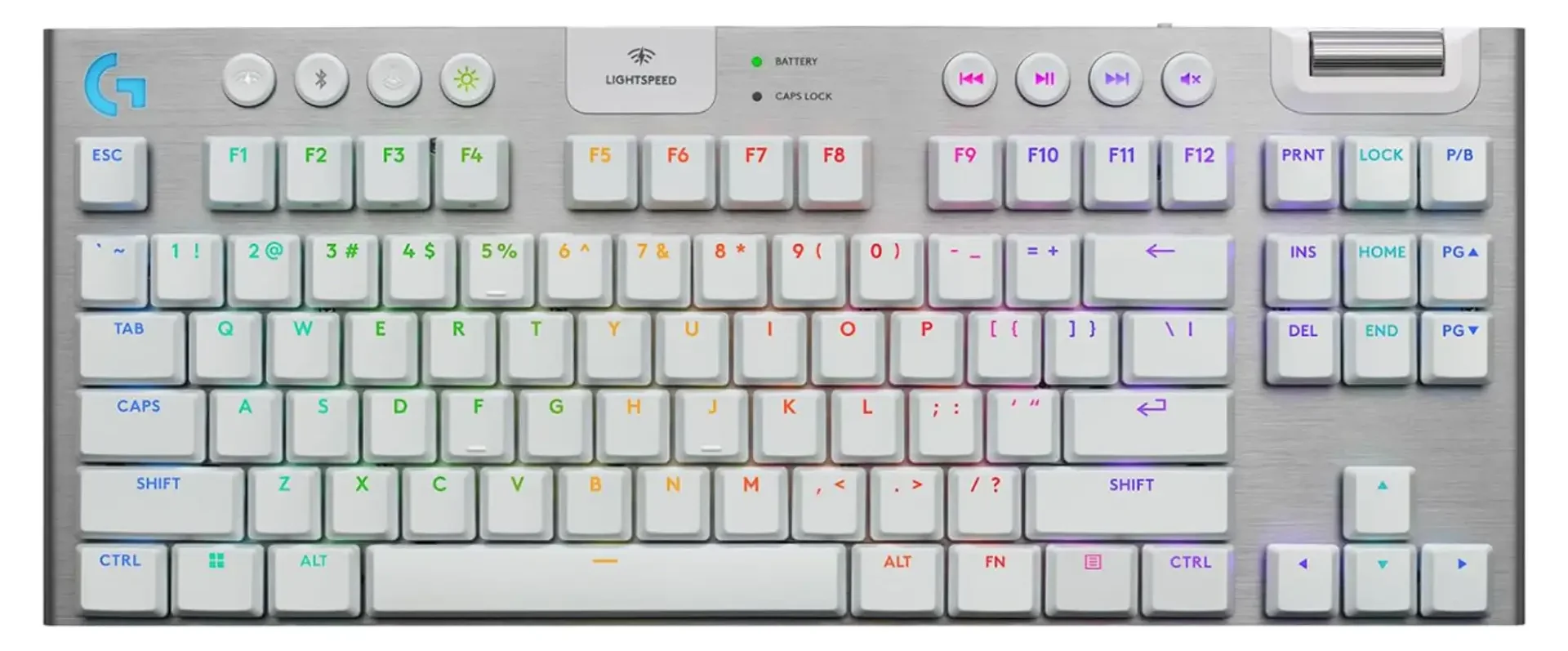
The G915 X suits buyers who want a keyboard that works properly out of the box and never asks for attention again. It is the most polished product in this guide and the least customizable, and those two facts are connected.
Key Specs
- Tenkeyless layout standing 22.5 mm tall, reinforced with a 1.5 mm aluminum top plate
- Lightspeed 2.4 GHz wireless with sub-1 ms class latency
- Low-profile GL switches with a 1.3 mm actuation point
- Three switch variants: tactile, clicky, and linear
- Bluetooth as a secondary connection
- Not hot-swappable
Logitech’s Lightspeed wireless has been the standard other manufacturers get measured against for years, and it holds up in competitive play without the qualifiers that apply to Bluetooth. The build is thin without feeling cheap, the aluminum plate keeps flex out of it, and the software is mature in a way smaller brands cannot match.
The compromises deserve real weight before ordering. Battery life is rated at roughly 42 hours, the weakest figure in this guide by a wide margin, which means charging it weekly rather than seasonally. Bluetooth pairs to one device at a time, so it covers two machines total rather than the three or four its rivals manage. It carries a premium price without hot-swap sockets, and reviewers have been measured rather than enthusiastic: TechRadar found it competent without matching the best boards available. This is a finished product for someone who wants exactly that, and buyers looking for a platform to modify should shop elsewhere in this list.
- Lightspeed 2.4 GHz holds sub-1 ms class latency without the caveats Bluetooth carries.
- A 1.5 mm aluminum top plate keeps flex out of a case only 22.5 mm tall.
- Logitech’s software is mature in a way smaller brands cannot match.
Best Low-Profile: NuPhy Air75 V3

Low-profile mechanical keyboards have historically asked for a trade, offering a thin case in exchange for a mushy typing feel. The Air75 V3 is the model that closes most of that gap.
Key Specs
- 13.2 mm at the front edge, sized to sit in front of or on top of a 14-inch laptop
- Custom Gateron Nano switches with 3.5 mm total travel and roughly 1.7 mm actuation on the Red linear
- Hot-swappable, including a hot-swappable knob in the top-right position
- 2.4 GHz plus Bluetooth 5.0 across up to four devices, and USB-C
- 1,000 Hz polling over 2.4 GHz and wired
- SOCD support, and browser-based configuration through NuPhy IO 2.0
The Gateron Nano switches are what make this work. NuPhy developed them for the board rather than buying a generic low-profile switch off the shelf, and the result keeps genuine mechanical character in a chassis thin enough to disappear under a monitor arm. The V3 additions are practical rather than cosmetic: the knob swaps out like any other key, and configuration runs in a browser with nothing to install, the same approach Keychron takes.
Against that sit two limits. Bluetooth drops to a 125 Hz polling rate, so gaming means the 2.4 GHz dongle. And the hot-swap sockets take low-profile switches only, which rules out the vast majority of the aftermarket.
- Custom Gateron Nano switches keep real mechanical feel in a 13.2 mm case.
- The knob in the top-right corner swaps out like any other key.
- Configuration runs in a browser through NuPhy IO 2.0, with nothing to install.
Best Budget: Aula F99

The F99 turns up constantly in recommendation threads, and the enthusiasm is justified on paper. It delivers a feature list that belonged to premium boards a few years ago, at entry-level money.
Key Specs
- 96% layout with 99 keys, fitting a numpad into a footprint close to a 75% board
- 8,000 mAh battery rated at roughly 400 hours with the RGB lighting off
- Hot-swappable PCB accepting both 3-pin and 5-pin standard MX switches
- Gasket mount with five layers of sound-damping material
- Double-shot PBT keycaps
- Tri-mode connectivity at a 1,000 Hz polling rate
Both headline claims hold up. That battery is double the capacity of the Keychron V6 Ultra’s cell, and owners consistently report barely watching the charge level. The hot-swap sockets take standard MX switches, a meaningful advantage over every low-profile board here, because the entire aftermarket switch catalog becomes available. The 96% layout is the other clever part, keeping a numpad while giving up the dead space that makes full-size boards awkward on a small desk.
The honest counterweight is the brand rather than the product. Aula is a budget manufacturer with less consistent quality control than Keychron, NuPhy, or Logitech, and considerably weaker warranty and support behind it. Units that arrive right tend to stay right, but the safety net if one does not is thin. The 1,000 Hz polling rate is also built for general use rather than competitive play.
- An 8,000 mAh battery is rated at roughly 400 hours with the lighting off.
- Hot-swap sockets take standard MX switches, opening the whole aftermarket.
- The 96% layout keeps a numpad without the dead space of a full-size board.
Best for Gaming: Keychron K2 HE

Hall effect keyboards read the position of a magnet rather than a physical contact closing, which allows the actuation point to be set anywhere in the keypress. Until recently that technology was almost exclusively wired.
Key Specs
- 75% layout with Gateron double-rail magnetic switches
- Actuation point adjustable from 0.2 mm to 3.8 mm in 0.1 mm steps
- Rapid Trigger support, resetting the key the moment it starts moving upward
- Tri-mode connectivity: 2.4 GHz, Bluetooth 5.2, and USB-C
- Hot-swappable, but for magnetic switches only
Rapid Trigger is the feature that matters for competitive play. A conventional switch has to travel back past a fixed reset point before it can register again, while a Hall effect switch resets as soon as the finger begins lifting. In practice that makes counter-strafing and rapid directional changes noticeably sharper. Setting a shallow actuation for movement keys and a deeper point for keys that must not trigger by accident is the other real gain, and the K2 HE offers both without a cable.
Two things need stating clearly. The board is capped at a 1,000 Hz polling rate, so it is not the fastest Hall effect keyboard available, and buyers chasing absolute latency figures will find wired options that beat it. More importantly, the sockets accept magnetic switches only. There is no tactile version of this keyboard, no clicky version, and there never will be. Anyone who prefers a tactile bump should choose a different board rather than buying this one and planning to change the switches later.
- Actuation sets anywhere from 0.2 mm to 3.8 mm in 0.1 mm steps.
- Rapid Trigger resets the key the moment your finger starts lifting.
- Brings Hall effect switching to a wireless board, which was almost exclusively wired until recently.
Best for Multiple Devices: Logitech MX Mechanical Mini

Anyone running a work laptop, a personal desktop, and a tablet from one desk has a different problem than the rest of this guide addresses. The MX Mechanical Mini solves that specific one better than anything else here.
Key Specs
- Compact low-profile layout, also sold in a full-size version
- Connects through the bundled Logi Bolt receiver or Bluetooth
- Three paired devices with single-key switching between them
- 1,500 mAh battery with backlighting that responds to approaching hands
- Three switch options chosen at purchase: Tactile Quiet, Clicky, or Linear
- Not hot-swappable
The device switching is genuinely seamless, and Logitech has had years to refine it. Low-profile switches with short travel also make this the easiest transition for anyone who spends half their day on a laptop keyboard, since the muscle memory carries across instead of fighting itself. Build quality matches the price, and the keyboard feels like a finished professional tool.
This is also the clearest illustration of the switch problem covered further down. Three switch options exist, one gets selected at checkout, and that choice is permanent because there are no hot-swap sockets. Anyone unsure whether they want tactile or linear should settle that question before ordering, because this keyboard offers no second chance. It is expensive for its size, too, sitting well above boards that allow more flexibility.
- Single-key switching moves between three paired devices without a pause.
- Short low-profile travel carries laptop muscle memory across instead of fighting it.
- The backlight wakes as your hands approach and settles again when they leave.
Best for Travel: Keychron K3 Max

The K3 Max is built around portability without dropping to a cramped layout. It is the board to pack when a laptop keyboard is not good enough but a full mechanical is too much to carry.
Key Specs
- 75% layout with 84 keys in an ultra-slim aluminum frame
- 2.4 GHz, Bluetooth 5.1, and USB-C connectivity
- 1,000 Hz polling over 2.4 GHz and wired
- 1,550 mAh battery rated at around 78 hours with the backlight off and 40 hours with it on
- Gateron low-profile switches in Red, Blue, or Brown
- Hot-swappable, and QMK programmable through Keychron Launcher
The aluminum frame separates this from the plastic slim boards it competes with, giving it enough rigidity to survive being carried without a case. Keeping the full function row and arrow keys in a 75% layout also means no relearning between the travel keyboard and the desk one, which is the usual frustration with 60% boards.
The size sets the compromises. A 1,550 mAh cell is small for this group, and 40 hours with the backlight on means charging it regularly rather than forgetting about it. The hot-swap sockets accept low-profile Gateron switches only, so the choice runs to three options rather than the full aftermarket.
- The ultra-slim aluminum frame survives being carried without a case.
- A 75% layout keeps the function row and arrow keys, so nothing needs relearning.
- Hot-swappable and QMK programmable through Keychron Launcher.
Why Go Wireless
A cable is not a serious problem for most people, so the case for going wireless rests on what removing it makes possible. The practical gains are worth listing plainly.
- It works away from the desk. Both Bluetooth and 2.4 GHz hold a connection across a room, so the same keyboard drives a desk PC during the day and a TV-connected machine from the couch at night.
- The desk looks cleaner. A mechanical keyboard is usually the largest object on a desk, and its cable is the one that cuts across the middle of everything. Removing it does more for a setup than any other single change.
- It travels. A 75% or low-profile board slides into a laptop bag. The NuPhy Air75 V3 measures 13.2 mm at the front and sits comfortably in front of a 14-inch laptop.
- Bluetooth frees a USB port. This one comes with a condition, covered directly below.
- One keyboard covers several machines. The Logitech MX Mechanical Mini holds three paired devices and switches between them with a single key. The NuPhy Air75 V3 holds four.
- Cleaning gets easier. The keyboard lifts straight off the desk instead of being tethered to the back of a tower.
That USB port point needs precision, because it gets repeated loosely everywhere. It is true of Bluetooth only. A 2.4 GHz connection runs through a dongle, and that dongle occupies exactly the port the cable would have used. Nothing is freed.
The distinction matters more than it sounds, because the two wireless modes are not interchangeable on performance either. Bluetooth polling rates on these boards are low: 90 Hz on the Keychron V6 Max, and 125 Hz on the NuPhy Air75 V3. For typing, email, and code, that is invisible. For a first-person shooter, it is not. Anyone buying a wireless keyboard mainly for gaming should plan around the 2.4 GHz dongle and accept the port it costs.
Two further points belong here. Battery figures are quoted with the lighting off, and RGB is what drains these boards. The Keychron V6 Ultra 8K is rated at up to 660 hours dark, and that falls to roughly 200 hours on its lowest LED setting. A wireless model also costs more than the equivalent wired one, because the radio, the battery, and the extra firmware work all have to be paid for somewhere.
Check the Switches Before Buying
This is the step most buying guides skip, and it is the one most likely to produce regret. A keyboard can be the right size, the right price, and from the right brand, and still be wrong because it cannot be had with the switch its owner wants.
Switches fall into a handful of families, and the gap between them is wider than any number on the box. Anyone choosing the best wireless mechanical keyboard for typing rather than gaming should weigh this table more heavily than the spec list.
| Switch type | Feel | Sound | Best suited to |
|---|---|---|---|
| Linear (Red, Silk POM Red, Gateron Nano Red) | Smooth from top to bottom with no bump | Quiet to moderate | Gaming, fast typists, shared rooms |
| Tactile (Brown, Banana) | A noticeable bump partway down | Moderate | Typing and general use, and the safest default |
| Clicky (Blue) | A bump plus a separate click mechanism | Loud | Solo desks only, never a shared office |
| Silent linear | Linear with a damped bottom-out | Quietest | Offices, shared rooms, late nights |
| Hall effect / magnetic | Linear feel with adjustable actuation depth | Moderate | Competitive gaming |
The trap is that “hot-swappable” does not mean what most buyers assume. It appears on spec sheets as a single yes-or-no feature, when in practice there are four situations, and three of them limit the choice permanently.
- Not hot-swappable at all. The switch selected at checkout is the switch that keyboard has for life. Changing it means desoldering every key or buying a new board. The Logitech MX Mechanical Mini and the Logitech G915 X Lightspeed TKL both work this way, and both are sold in three switch flavors, so the decision is made once and cannot be revisited.
- Hot-swappable, low-profile switches only. The socket accepts replacements, but only other low-profile switches. Standard MX-footprint switches, which is what most aftermarket switches are, will not physically fit. This applies to the Keychron K3 Max and the NuPhy Air75 V3.
- Hot-swappable, magnetic switches only. Hall effect boards read a magnet rather than a physical contact, so they accept magnetic switches and nothing else. A tactile or clicky option will never exist for that keyboard. The Keychron K2 HE sits here.
- Fully hot-swappable with a standard MX footprint. The switch can be changed at any point, for any reason, with a puller and ten minutes. The Keychron V6 Ultra 8K, the Keychron Q1 Max, and the Aula F99 all qualify, and it is a genuine long-term advantage.
A smaller version of the same problem is worth checking before ordering. A keyboard listed with three switch options often stocks only one or two of them in a given region, and the switch choice is frequently tied to the colorway. Confirm that the specific combination is available, not just that the model offers it on paper.
How These Picks Were Chosen
Rekobyte researched these keyboards rather than testing them in a lab, and it is worth saying so directly. The picks above come from five sources, weighted in this order.
- Owner feedback over time. Threads on Reddit, keyboard groups on Facebook, and Quora discussions, along with the longer Amazon reviews written months after purchase. Sustained ownership reports carry far more weight here than launch-week impressions, because the problems that matter tend to surface around month six.
- Brand trust and support. Warranty terms, firmware update history, whether replacement parts and switches stay available, and what happens when a unit arrives dead. This is where the established brands separate from the budget field, and none of it appears on a spec sheet.
- Build quality. Case material, mounting style, stabilizer quality, and keycap material. Double-shot PBT keycaps outlast ABS, and a gasket mount changes how a board sounds and feels more than most switch swaps do.
- Cost against what is delivered. Not the cheapest option and not the most expensive one, but whether the price buys the feature list attached to it.
- Independent measurements. Published figures from RTINGS, Tom’s Hardware, PCWorld, and TechRadar, cross-checked against manufacturer claims. Rated battery life and measured battery life are rarely the same number.
One observation in the full-size pick is first-hand rather than researched. Full-size Keychron boards sit high at the front edge, and that height becomes noticeable during long typing sessions, which is why a wrist rest is mentioned alongside it.
Keyboards That Did Not Make the List
Several boards come up repeatedly in recommendation threads but were excluded from this guide. The reasons are worth stating, because most of them are good products sitting in the wrong category.
- Wooting 80HE and 60HE. Among the best analog keyboards made, and wired only. They belong in a different guide.
- Ducky One 3 SF. Excellent build quality with no wireless option.
- Razer BlackWidow V4 75%. A strong 75% board, again wired only.
- GMMK 3. Wireless variants exist, but the range is confusing enough that most recommendations for it are actually pointing at the wired models.
- Royal Kludge RK84. Cheap and widely available, but quality control is inconsistent and the Aula F99 beats it on battery capacity and layout at similar money.
- ASUS ROG Azoth. A capable enthusiast board priced against the Keychron Q line without the same firmware and parts ecosystem behind it.
Conclusion
None of these picks outrank the others, because each one wins a category the others do not compete in. The board that suits the widest range of buyers, though, is the Keychron V6 Ultra 8K. It combines a full-size layout, an 8,000 Hz polling rate over 2.4 GHz, up to 660 hours of battery life, and fully hot-swappable standard switches, so the typing feel can be changed at any time without replacing the keyboard.
Every other pick exists because that answer is wrong for someone. A desk without room for a numpad points to the Q1 Max. A bag that has to carry the keyboard points to the K3 Max. A tight budget points to the Aula F99 without giving up much that matters. Whichever category fits, settle the switch question first. Size, price, and brand can all be corrected later by selling the board on, but a keyboard that cannot accept the switch its owner wants is a decision made permanently at checkout.